Karnataka Bhoomi is a government program that aims to digitize land records and make them more accessible to locals. The project, launched in 2000, is a land records management system that digitized all manual RTCs that existed at the time of data submission. The system provides seamless access to Karnataka Bhoomi documents from anywhere in the globe, allowing citizens to purchase property in Karnataka with confidence.
Here's everything you need to know about Bhoomi Karnataka, a digitized land records effort.
Bhoomi Karnataka Portal.
The official Bhoomi portal offers services such as viewing revenue maps, citizen registration, RTCs, conversion request apps, tracking conversion requests, and mutation services. With over 6000 Gram Panchayats providing land record services, the portal has established itself as a trusted resource for people looking to invest in plots in Karnataka.

Quick Information About Bhoomi Karnataka Online
Here are some details regarding the Bhoomi Karnataka Online Portal:
Particulars
Description
Name of the portal
Bhoomi Online RTC
Website address
https://rtc.karnataka.gov.in/Service78/
Aim
To make land records in Karnataka digitally accessible
Services
RTC (Record of Rights, Tenancy, and Crops)Mutation of Land Records
Property Encumbrance Certificate
Launched by
Government of Karnataka
Managed by
Bhoomi Monitoring Cell, Revenue Department of Karnataka
Contact Information
Director (Bhoomi & UPOR) Bhoomi Monitoring Cell, SSLR Building, K.R. Circle Bangalore - 560001, bhoomi@karnataka.gov.in, 080-22113255
The Bhoomi portal, developed for the maintenance of Karnataka land records, offers the following services to citizens:
Category of Service
Services Offered
RTC Services (Pahani)
1. View RTC and MR
2. View Khatha Extract
3. View RTC Information
4. I-RTC
5. I-RTC Wallet
6. RTC with Sketch (Beta)
7. Echawadi
Report Services
1. Dispute Cases
2. Village Wise Pendency
3. Bhoomi Dashboard
4. Bhoomi RTC Mutation History
5. BHoomi DI Dashboard
6. Bagair Hukum Reports
7. Adhaar Seeding Reports
8. Land Beat Reports
9. Details of Applications Received Under Form 57
10. Land Conversion Disposed Report
Land Conversion Services
1. Apply Online for Land Conversion
2. View Conversion Request Status
3. Download Final Conversion Orders
Survey SSLR Services
1. Viewing of Survey Documents
2. Request for Survey Documents
3. Revenue Maps
Other Services
1. Citizen Registration
2. RTC XML Verification
3. Bhoomi Online Mutation Services
4. EODB Services
5. Bhoomi
6. Crop Loan Waiver System
7. Mojini
8. Parihara
9. Name Match Algorithm
10. Dishaank
11. Pahani Online | I-RTC
12. Citizen Portal
Bhu Suraksha is a paperless land record initiative on Bhoomi Karnataka.
Land records, survey maps, and other associated materials are digitized and securely kept under the Bhu Suraksha project. This eliminates reliance on tangible documents and fosters trust in transactions, particularly for purchasers looking to purchase a home in Karnataka or explore residential possibilities.
Key Features of Bhu Suraksha:
All land documents, survey maps, and related information are digitized and stored online.
Citizens do not have to rely just on tangible documentation to prove ownership or record history.
Main Objectives of the Initiative
Improve citizens' access to land records.
Ensure greater accuracy and safety for land data.
Reduce the frequency of trips to government offices.
Reduce long lines at revenue and land record departments.
Online Access and Security
The program provides secure access to official government portals.
Users can quickly and easily download certified copies of land records.
This function assists homebuyers, banks, and legal authorities.
Clear procedures ensure effective data backup and security against unauthorized access.
System Integration and Automation
Bhu Suraksha removes manual record updates.
The technology integrates with platforms like Bhoomi and other government databases.
Any changes in ownership or land borders are automatically updated across all linked systems.
For example, after a land sale is documented, the new owner's information becomes available immediately.
Benefits of Paperless Records
Reduces errors caused by outdated or unclear physical documentation.
Users can check land history and ownership changes over time.
Increases trust in land records and facilitates property transfers.
improves the overall land management system in Karnataka.
What Does Pahani Or RTC Mean in Karnataka Land Records
In Karnataka, land records are mostly managed using the Bhoomi platform. RTC (Record of Rights, Tenancy, and Crops), commonly known as Pahani in Kannada, is a key land record document in Karnataka. The main components of an RTC document are as follows:
Details about the landowner or joint owners (if applicable)
Details about soil type
Describe the type of land
Crops grown on the concerned land.
Area measurements
Water consumption charges, or the quantity of water consumed to maintain the land.
Commercial, non-agricultural, agricultural, residential, and flood zones
Nature of possession
Bank loan details
Tenancy Details
Why RTC or Pahani is important in Karnataka land records.
The RTC or Pahani document is essential for establishing proof of ownership, obtaining loans, and resolving disputes. It is also updated during property transfers, making it essential for anyone looking to invest in homes in Karnataka.
Serves as a vital document for demonstrating proof of ownership of a plot of land.
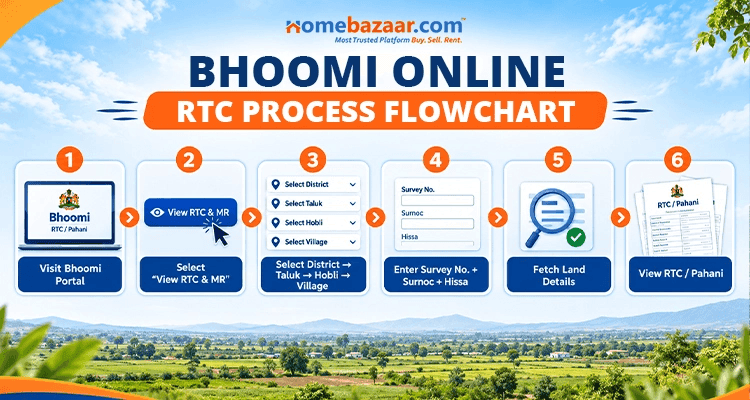
How to View RTC (Pahani) and MR on Bhoomi Karnataka
To access the Record of Rights, Tenancy, and Crops (RTC) and Mutation Register (MR) via the Karnataka Land Records Portal, take these simple steps:
Step 1: Go to the Karnataka Land Records Portal, https://landrecords.karnataka.gov.in/, and scroll down significantly. Click 'View RTC and MR'.

Step 2: You will also be able to check the Mutation Register and the land's status. Enter the needed information, such as the District, Taluk, Hobli, Village, and Survey number, and then click the Go button. It will then prompt you to enter the remaining information, including Surnoc, Hissa number, and period.

Step 3: The system will now display the whole information listed below. If you wish to see the entire hand copy of the RTC, click View at the bottom. This will give you a digitized copy of the RTC in the exact template that you can print.

How To Extract Mutation Report on Bhoomi Karnataka
To extract the mutation of a property report on the Karnataka Bhoomi portal, the user must follow the steps outlined below:
Step 1: Access the Bhoomi site (Bhoomi Karnataka) or Bhoomi land records in Karnataka. Click on the 'View RTC and MR' link under Bhoomi services to go to the mutation report page.
Step 2: Select the 'Mutation Report (MR)' tab to view the Status of Mutation.

Step 3: Enter the needed information, including the Hissa Number, district, Hobli, Taluk, Village, Survey No., and Surnoc Number. Once you've input all of the information, click 'Fetch Details.'
Checking Revenue Maps on Bhoomi Online.
The Bhoomi portal (Bhoomi Karnataka) in Karnataka now provides online land registration services. Citizens can access the income map online by following the steps outlined below on the Bhoomi portal (land records Karnataka gov).
Step 1: Log in to the official Bhoomi Land Records Karnataka website (Bhoomi online), which is https://landrecords.karnataka.gov.in/, and click on the Bhoomi icon.
Step 2: In the Survey (SSLR) services, select the 'Revenue Maps' tab.

Step 3: You will be led to the following window. You can choose the District, Taluk, Hobli, and Map kinds and proceed to view the maps in PDF format.
How to Apply for Land Conversion on Bhoomi Karnataka Portal
The Bhoomi portal enables users to apply for land conversion online in Karnataka.
Step 1: Visit the official website of Karnataka Land Records Department in Karnataka. Scroll down on the homepage and select the 'Apply online for land conversion' tab.
Step 2: Enter your username, password, and captcha code to log in.
Step 3: The form will be presented. Fill out this form completely and then click the submit button.
Land Conversion Requests in Bhoomi, Karnataka
Once you've applied for land conversion, you can monitor the status of your request online using the procedures below.
Step 1: Access the land records department's website (Bhoomi online) and select the View Conversion Request Status option.
Step 2: You will be led to the next page. Enter either the affidavit ID or the user ID, then click the search button.
Bhoomi Karnataka Land Records: Fees and Charges
The Karnataka state government has allowed digital delivery of citizen-specific services through the Bhoomi platform. In addition to the digital services available on the portal, land record services can be obtained at citizen services kiosks across the city. The state government charges a fee in exchange for the services supplied. The fees for major services linked to Karnataka land records are as follows:
Documents
Charges
Tippan
Rs 15
RTC or Records of Rights, Tenancy and Crops
Rs 10
Mutation Extracts
Rs 15
Mutation Status
Rs 15
Bhoomi Karnataka Land Records: Fees, Formats, and Guidelines.
The Bhoomi portal is the official platform for maintaining land records in Karnataka. Here's a quick overview of the services, how much they cost, what format you'll receive, and where you may get support.
Land Record Services Overview
Service
Purpose
Fee (Approx.)
Document Format
Downloadable Guide
Record of Rights, Tenancy, and Crops (RTC) / Pahani
Primary document showing land ownership, area, liabilities, and crop details.
INR 10 to INR 15 per copy
Printout from Kiosk (Bhoomi or Nada Kacheri) with QR Code and Digital Signature.
Look for "Bhoomi User Manual" or "RTC Extraction Guide" on the official Bhoomi portal or Sakala website.
Mutation Extract
Document showing the history of land ownership transfer (sale, inheritance, gift, etc.).
INR 15 to INR 25 per copy
Digitally signed document. (Used for legal verification of the transfer process).
Search for "Mutation Status/Extract Guide" on the Bhoomi or Kaveri 2.0 website.
Tiplaan (Sketch/Map)
Digital map showing the exact boundary and spatial extent of the land parcel.
INR 25 to INR 35 per sketch
Digital Map/Sketch (PDF format) with coordinates and survey details.
Check the "Survey Sketch/Tiplaan" section of the Bhoomi portal or contact the Survey Department for a step-by-step PDF.
Conversion Certificate
Permission required to change land use from agricultural to non-agricultural (residential or commercial).
Varies significantly based on land area and location.
Digitally signed e-certificate (PDF) from the Deputy Commissioner (DC) office.
Check the "E-Swathu" or "Land Conversion" section on the main government land services portal for a detailed FAQ or application guide.
Affidavit-Based Online Land Conversion System
The state of Karnataka has an online land conversion system based on affidavits to simplify the licensing process for changing agricultural property to non-agricultural usage. The Karnataka State Government implemented this simple and transparent procedure to reduce land conversion delays. Let us quickly go over the procedure for converting land using an affidavit. To acquire an affidavit for a land transaction, simply visit http://landrecords.karnataka.gov.in/service63. Please provide the RTC information, an 11E drawing, and a validly sworn affidavit. If a piece of the land is going to be transformed, an 11E drawing will be created.